What is Keyword Explorer?
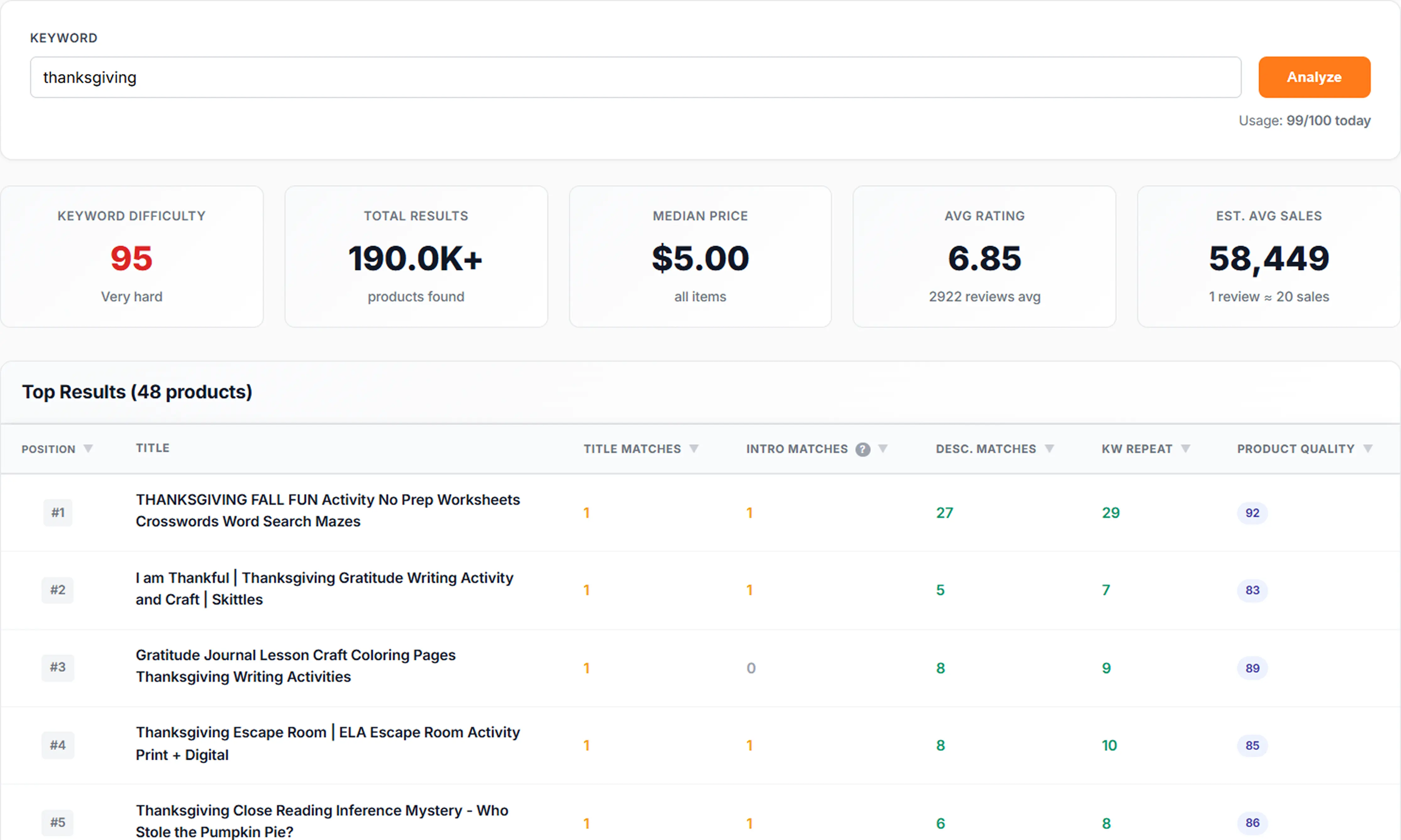
Keyword Explorer is an advanced TPT competitor keyword analysis tool that shows you exactly how top-ranking products use your target keyword. It analyzes keyword placement in titles, descriptions, and other critical areas to help you understand what works and what doesn't for Teachers Pay Teachers listing optimization.
Why TPT Sellers Struggle With Ranking (And How Keyword Explorer Helps)
Most Teachers Pay Teachers sellers don't rank because they choose keywords that have too much competition, are too broad, are not used by buyers, don't match search intent, or are not optimized properly inside the listing.
Even great products stay invisible when the keyword is not in the title, the keyword is buried too far in the description, competitors use the keyword more strategically, or listings don't meet quality expectations.
Keyword Explorer solves this by showing: how high-ranking products actually use the keyword, what they do right, where they are weak, and how you can outperform them. This transforms "guessing" into data-driven SEO for TPT sellers. Learn more in our guide on how to rank higher on TPT.
Problems Keyword Explorer Solves
- You don't know whether a keyword is actually used by successful sellers
- You don't know how many times top sellers use the keyword
- You don't know where they place it
- You can't tell quality listings apart from "keyword-stuffed" ones
- You can't identify why a competitor is ranking
- You don't know how to adjust your product listing to beat them
Keyword Explorer removes the guesswork and shows exactly what drives ranking.
Key Features
- Keyword usage analysis in Title, first 250 chars, and full description — See exactly where competitors place keywords
- Product Quality scores (0-100) for top listings — Understand which products rank high due to quality vs. keyword stuffing
- Identify gaps to beat competitors — Find opportunities where top products are weak
- Find true quality leaders vs. keyword stuffing — Distinguish between quality optimization and spam
- Competitor pricing and rating analysis — See how pricing and ratings correlate with keyword usage
- Actionable insights for optimization — Get specific recommendations on how to improve your listings
Who Should Use Keyword Explorer?
Keyword Explorer is perfect for TPT sellers who want to understand keyword usage and optimize their listings for better rankings.
New TPT Sellers
Trying to understand how successful sellers use keywords and what makes listings rank on Teachers Pay Teachers.
Experienced Sellers
Optimizing older listings that aren't performing well and need keyword strategy improvements.
Sellers Stuck on Page 2–4
Wanting to rank faster with new products or break into the first page of TPT search results.
Keyword Evaluators
Anyone evaluating a keyword before creating a product to ensure it has ranking potential.
How to Use Keyword Explorer (Step-by-Step Guide)
Follow these steps to analyze competitor keywords and optimize your TPT listings for better rankings:
-
Enter a keyword
Start with the keyword you want to rank for (ex: "decodable readers", "place value worksheets").
-
See how competitors use it
The tool scans the highest-ranking products and shows exactly where the keyword appears in titles, descriptions, and metadata.
-
Analyze quality vs keyword stuffing
High Product Quality Score = strong listing. Low score = weak listing relying mostly on keyword repetition.
-
Find listing gaps
Identify what competitors forgot to do: weak titles, missing keywords, low rating, etc.
-
Optimize your own listing
Apply improvements based on real competitor patterns, placing keywords strategically where top sellers use them.
-
Re-check after updating
Track progress and update keywords for even better rankings using Keyword Explorer to monitor your improvements.
Keyword Explorer vs. Other TPT SEO Tools
See how Keyword Explorer compares to manual research and other TPT SEO tools:
| Feature | Manual Research | SellerSpy | SEOLumina Keyword Explorer |
|---|---|---|---|
| Finds how competitors use keywords | No | Limited | Full competitive analysis |
| Shows keyword placement | No | No | Title, first 250 chars, full description |
| Shows Product Quality Score | No | No | Yes |
| Shows gaps & weaknesses | No | No | Yes |
Why Use Keyword Explorer?
Simply knowing a keyword isn't enough - you need to understand how successful products use it. Keyword Explorer reveals the patterns and strategies that top-ranking products use, helping you optimize your listings to compete effectively.
Outcome: Know exactly what to improve to rank higher than your competition. Understand where top products place keywords and optimize accordingly to beat them.
Frequently Asked Questions
Does Keyword Explorer show real competitor listings?
Yes. Keyword Explorer scans real TPT listings currently ranking for your keyword, showing you exactly how top sellers use keywords in their titles, descriptions, and metadata. You see the same products teachers see when they search on Teachers Pay Teachers.
How many competitor products can I analyze?
Keyword Explorer analyzes up to 40 top-ranking listings per keyword, giving you comprehensive competitive intelligence on how successful sellers optimize their products. This covers the first several pages of TPT search results for most keywords.
How is Product Quality Score calculated?
Product Quality Score combines listing completeness, readability, keyword placement, pricing, ratings, and metadata quality into a 0-100 score. It helps you distinguish quality listings from keyword-stuffed ones and identify which competitors are ranking due to strong content versus keyword density alone.
Can this help me choose the correct keyword?
Yes. Keyword Explorer reveals whether a keyword is high-intent, competitive, or poorly used on TPT, helping you make data-driven decisions before creating or optimizing products. You can validate keyword potential before investing time in a new listing.
How often is the data updated?
SEOLumina continuously refreshes ranking and keyword data to ensure accuracy, so you always see current competitive information. Data reflects recent TPT search results and listing updates.
Where should I put my keyword in my TPT title?
Keyword Explorer shows you exactly where top-ranking products place the keyword in their titles—front-loaded, middle, or end. Most high-ranking TPT listings use the primary keyword in the first 60 characters. Use the tool to compare placement across competitors and match or improve on the pattern.
What is keyword placement analysis?
Keyword placement analysis shows where your target keyword appears in competitor listings: in the title, in the first 250 characters of the description, and across the full description. This helps you understand TPT listing optimization strategies that actually drive rankings and avoid missing critical placement opportunities.
Is Keyword Explorer free?
SEOLumina offers a free forever plan that includes Keyword Explorer. You can analyze competitor keywords and improve your TPT listings without paying. Paid plans unlock higher daily limits and additional tools like Product Explorer and Sales Estimator.
How do I outrank competitors on Teachers Pay Teachers?
Use Keyword Explorer to see how top sellers use your target keyword, then optimize your title, description, and metadata to match or exceed their keyword placement and listing quality. Focus on Product Quality Score signals: strong titles, clear descriptions, and strategic keyword use rather than stuffing. Combine with our guide on how to rank higher on TPT for best results.
What is TPT competitor keyword analysis?
TPT competitor keyword analysis is the process of studying how successful Teachers Pay Teachers sellers use keywords in their listings. Keyword Explorer automates this by showing keyword placement, density, and quality scores for up to 40 top-ranking products per keyword, so you can replicate what works and find gaps to outperform them.
Can I use this for TPT listing optimization?
Yes. Keyword Explorer is built for TPT listing optimization. It reveals where competitors place keywords, how complete their listings are, and where they are weak. Use the insights to improve your own title, description structure, and metadata so your listing ranks higher and converts better on Teachers Pay Teachers.
How does this compare to manual TPT keyword research?
Manual research means opening dozens of TPT search results and copying data by hand. Keyword Explorer does full competitive analysis in seconds: keyword placement in title and description, Product Quality Scores, and gap analysis. You get consistent, comparable data for up to 40 products per keyword without spreadsheets or guesswork.
Related Tools & Guides
- Keyword Generator — generate long-tail TPT keyword ideas and compare difficulty
- Product Explorer — compare your listing to competitors and find optimization opportunities
- Sales Estimator — estimate TPT product sales and revenue from reviews
- How to rank higher on TPT — complete SEO guide for Teachers Pay Teachers
- Blog — TPT keyword strategy, title optimization, and competitor analysis tips